
234 posts tagged with "Foxglove"

Release notes for the Foxglove web and desktop app.

View All Tags

Foxglove 3.0.0

πŸ€– Agent sidebar: a built-in agent to work on your data Beta​

Foxglove's built-in agent builds layouts, writes user scripts, runs your request as a query on Search, and answers questions about your data. Read-only tools run on their own; anything that makes a change waits for your approval. The agent sidebar is available on all plans. Read more about Agent sidebar.

πŸ”€ Comparison mode: debug what changed between runs​

Select two or more recordings, sessions, or events from real-world logs or simulations, and click Compare to put them on one shared visualization timeline. Each source takes a slot labeled A, B, C, and so on; Plot, State Transitions, and Map draw every slot at once, while single-source panels such as 3D show one at a time. Comparison mode is generally available on Pro, Enterprise, and Academic plans, for basic and developer seats. Read more about Comparison mode.

πŸ”Ž Semantic search: find image frames and actions by describing them Beta​

Query your data by describing the action your robot took (semantic search over video embeddings) or what's in the frame (image embeddings). Combine a visual prompt with other query fields, for example visual("package dropped") and /robot_state == autonomous, to search recordings' image and video topics alongside other log data. Visual search is in beta on Pro and Enterprise plans; contact sales for access. Read more about Semantic search.

πŸ“Š Grafana integration: query Foxglove data in your dashboards​

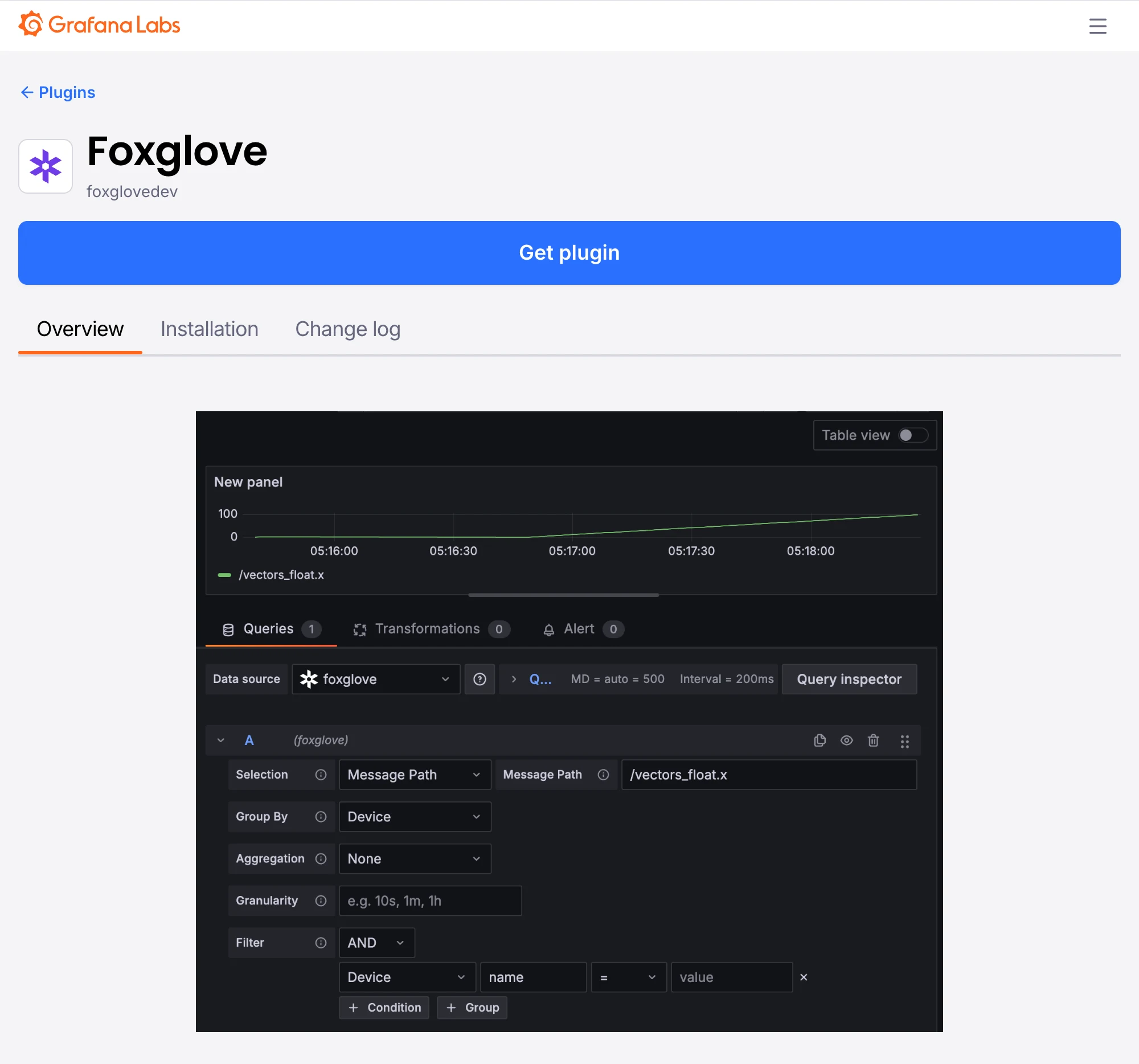
The Foxglove data source plugin, published in the Grafana plugin catalog, turns a FoxQL expression such as /imu.linear_acceleration.x into a time series, using the same query engine as the Search page. The plugin queries the Foxglove data platform directly, so you can build Grafana dashboards on your data in Foxglove. Contact sales for access. Read more about the Grafana plugin.

The Foxglove data source plugin in the Grafana plugin catalog, with a query editor charting a message path as a time series

πŸ—„οΈ Bring your own storage: general availability​

Bring your own storage (BYOS) is generally available (GA) across AWS, GCP, and Azure. Keep your recordings in the cloud storage bucket they already live in while Foxglove indexes each file in place so you can query and stream it, without duplicating or moving your data. Contact sales to get started. Read more about Foxglove Cloud, bring your own storage.

πŸ”Œ Desktop MCP server: general availability​

The desktop app's local Model Context Protocol (MCP) server is generally available, with access to the same tool catalog as the agent sidebar. Turn on Local MCP server under Settings β†’ Personal β†’ Agents & MCP. The Desktop MCP server is available on Pro, Enterprise, and Academic plans. Read more about Desktop MCP.

New & Improved
  • Fleet: the on-device process that monitors and uploads recordings is now called Foxlet across the app and the docs; package, binary, and path identifiers are unchanged β€” see Foxlet
  • Gallery: opening a result shows the details panel, and cards animate into their re-wrapped positions
  • Gallery: on a narrow window the details panel takes over the screen instead of squeezing the cards beside it
  • Search: previews follow the pointer as you scrub, and topic chips in a result's details switch the preview to the topic you click
  • Search: a shared link opens Gallery with the preview topics the sender pinned β€” see Gallery
  • Search: queries mix AND and OR without parentheses; AND is applied first β€” see Search
  • Search: parentheses nest to any depth, and a ?query= link created before 3.0.0 opens with an empty query bar; saved searches and recents are unaffected
  • Search: a recording's Source Details shows the query summary with its grouping parentheses, at any depth
  • Search: topic autocomplete matches fuzzily, so a topic turns up without typing the start of its path
  • Search: the empty state offers Import data when an organization has nothing to search yet
  • Search: device and time-range results list the sessions covering that device and range in List view
  • Recordings: a multi-recording visualize view downloads one merged MCAP spanning every recording; comparison views don't offer Download, because that export would be incomplete
  • State Transitions: the legend is called series labels, and hiding it compresses each row so more series fit on screen β€” see State Transitions panel
  • Image panel: decodes 12-bit Bayer raw images (bayer_rggb12, bayer_bggr12, bayer_gbrg12, bayer_grbg12) β€” see Supported encodings
  • Panels: double-clicking a panel title expands or collapses it
  • Panels: action buttons have clearer spacing and stay easier to see
  • Playback: the playback range editor snaps to the playhead, and while its dialog is open, keyboard shortcuts and command palette entries trim the range to the playhead or reset it β€” see Controls and shortcuts
  • Performance sidebar: Export diagnostics saves a JSON troubleshooting report, which stays on the machine until you share it
  • Performance sidebar: charts label and scale automatically, readings align, and a warning appears when hardware acceleration is unavailable
  • Plot panel: adding a series expands, scrolls to, and highlights it in the settings sidebar
  • Tables: the action bar on Recordings, Sessions, and Events stays pinned to the top while you scroll
  • Filters: the Recordings, Events, and Sessions filter rows stay compact at narrower window widths
  • App bar: the sidebar toggle buttons stay highlighted while their sidebar is open
  • Embedding: basic-seat members can open layouts supplied by an embedding application β€” see Embedding Foxglove
  • Admin: the Enterprise usage page shows current seat counts alongside infrastructure credits
  • Remote data loader: a stream failure names the loader and shows its error in the Problems sidebar
Performance
  • Plot and State Transitions load faster on bring-your-own-storage sites, with nothing to configure
  • Search: faster topic discovery on large sites
  • Gallery: loads faster when a query returns many results
  • Recordings: the page loads faster in projects with many recordings
  • The layout menu opens faster
API
  • API keys: a request missing a capability returns the MissingApiKeyCapability code and names the capability it needs
  • Saved searches: GET /v1/saved-searches/{id} returns a working run URL. Re-save a search created before 3.0.0 to refresh that URL
  • Remote data loader: shareable links carry manifest query parameters in ds.manifestParams, and links in the earlier flat form still open β€” see Shareable links
Fixes
  • Desktop: signing out shows the sign-in screen instead of looping on "Signing out…"
  • Desktop: standalone-license mode no longer crashes on the dashboard, the examples page, or the onboarding wizard's examples step
  • Desktop: quitting no longer raises a JavaScript error dialog
  • Playback: a Data Platform stream that closes during inactivity no longer fails playback
  • Playback: merged data sources whose time ranges don't overlap play and scrub without errors
  • Gallery: no longer crashes on very large result counts
  • Gallery: arrow keys step through cards instead of scrolling the page, and the focused result stays in view as the details panel opens or closes
  • Search: video previews still play when the keyframe is before the result window, the file is large, or the result matches more than one topic
  • Search: the query field no longer flashes "Loading topics…" on refocus or expands to two rows on narrow windows, and the topic picker settles as it closes
  • Search: the results page no longer shows duplicate decade labels, doubled or missing dividers, a misaligned query status bar and sort control, or a details panel that overflows its boundary
  • Search: backward date navigation stops at the earliest supported date, and durations longer than a second read in compact units
  • Search: a FoxQL function suffix such as .@abs reports an error instead of silently returning results for the untransformed value
  • Search: results no longer shift horizontally when the page scrollbar appears
  • Map panel: timeline previews highlight the matching position in every comparison slot
  • Plot panel: warning icons no longer flicker while you hover a comparison badge, and no spurious warning triangle appears when a series or comparison slot becomes active
  • Plot and State Transitions: Label field and Value field settings appear only for expressions that are dynamic series
  • Video export: exports run when the data source has reported unrelated errors, and console errors read as messages instead of internal identifiers β€” see Video export
  • Panels: an expanded panel collapses back to its current position after the workspace is resized
  • 3D panel: map tiles load without waiting for a camera or playback-time change
  • Performance sidebar: data throughput reads correctly for local and cloud recordings
  • Timeline: a recently added device shows its current name instead of a stale cached one
  • Projects: keyboard navigation works in the project picker
  • Organizations: inviting basic-seat members works when an organization has reached its paid seat limit
  • Agent sidebar: plots of ROS timestamps use the units you asked for
  • Onboarding: the quickstart's sample drone stream no longer ends getting-started guidance before you have viewed your own data

Downloads: Linux: deb amd64 arm64, snap amd64 | Windows: x64 arm64 | Mac: Apple Silicon Intel
Foxglove 2.59.0

πŸ”Œ Desktop MCP server​

The Foxglove desktop app can run a local MCP (Model Context Protocol) server so external coding assistants like Claude Code, Cursor, Claude Desktop, and other MCP clients can see and control Foxglove. Your agent can access the Data Platform, search your organization's recordings, sessions, and events, build layouts, write user scripts, control playback, and search the docs. Turn on Local MCP server under Settings β†’ Agents & MCP; it needs a Pro or Enterprise plan and a developer seat. Read more about Connect your own agent (MCP).

Find the right recording faster: write a FoxQL query over devices, metadata, topics, and message fields, then review matches as Gallery preview cards before you open one. List and Timeline views stay one click away. Read more about Search.

New & Improved
  • Foxlet Settings: Auto-delete local files after import deletes each recording from the device after Foxlet uploads it β€” see Delete recording files
  • Plot panel: clearer warnings for out-of-range array slices and matched values that cannot be plotted
  • Raw Messages panel: improved header layout across narrow and wide panel sizes
  • Playback: the timeline info (i) button opens the Sources sidebar; with an active search query it opens the Source Details modal so you can review or clear the query
  • Recordings: the list renders as soon as it loads instead of waiting on pending imports
  • Command palette: type a project name to switch projects or open the Projects page
  • Search: tidied spacing in the query bar's suggestion menu
  • Search: the query bar drops its clear (Γ—) button β€” select and delete the text to clear a query
API
Fixes
  • Navigation: clicking the entry for the page you are already on no longer discards that page's state, such as the active search, its time range, and its view mode
  • Local files: reopening after a page refresh no longer fails when browser read access has lapsed β€” a dialog lists the files that need it and Allow access requests them all at once
  • Search: topic pickers no longer obscure their triggers when opened
  • Events sidebar: timeline events no longer remain stuck in a loading state
  • Extensions: an organization extension now updates to the registry's latest version even when a local extension with the same ID is installed

Downloads: Linux: deb amd64 arm64, snap amd64 | Windows: x64 arm64 | Mac: Apple Silicon Intel

Foxglove 2.58.0

πŸ“ˆ Plot panel: one sub-series per array index​

Messages often pack related values, such as accelerometer axes or joint positions, into a numeric array. The Plot panel's timestamp plots offer an Array expansion setting: choose By index to draw one sub-series per array element, labeled with its source index. None remains the default, so existing layouts keep their current behavior, and ranged slices retain their source indices. Read more about Array expansion.

πŸ” Search from the Raw Messages panel​

Hover over a value in the Raw Messages panel and choose View in Search to open Search with a query for that message path and value, scoped to the recording's time range. The same action on the message header searches for any message on that path. Search returns results from recordings that have been indexed. Read more about Search.

⌨️ Keyboard shortcuts for message stepping​

Read a topic message by message without reaching for the mouse. With the Raw Messages panel selected, Alt+[ and Alt+] (Option on macOS) step to the previous and next message on that panel's path. Read more about Message stepping.

πŸ”— Visualize multiple recordings merged as one​

Select two or more imported recordings on the Recordings page and choose Visualize to open them merged into a single timeline, without creating a session first. Topics from every recording share one playback range, and the app bar lists each recording. The Source info sidebar opens with a Merged section spanning the full combined range, followed by the name and time range of each source.

New & Improved
  • Gauge panel: an Origin setting grows the fill outward from a chosen value, with an optional Mirror color at origin toggle for a diverging color ramp
  • Plot panel: series settings show the same error and warning indicators as the plot legend, flagging missing topics, invalid paths, timestamp problems, and series with no matching data
  • 3D panel: in object inspection mode, a click that intersects several objects opens a disambiguation menu labeling each one with its object ID alongside the topic
  • 3D panel: hover tooltips show up to 5 metadata rows plus a count of the rest, so tooltips for objects with large metadata collections no longer cover the panel
  • Map panel: highlighted locations use a more saturated color that stays legible in both light and dark themes
  • Remote data loader: connection failures report a network error within about 10 seconds, with VPN and firewall guidance and a Retry button
  • Remote data loader: the Problems sidebar shows the error message the upstream service returns, such as an expired recording link
  • Command palette: Switch project drills into a searchable project list, so you can change projects without leaving the keyboard
  • Billing: Enterprise plans can view their usage from Settings β†’ Billing
  • Bring Your Own Storage (BYOS): the bucket notification commands for AWS and Azure filter to .mcap and .bag files β€” see Configure bucket notifications for the current commands
  • Search: results scroll with the rest of the page, and the query bar and results toolbar pin to the top
  • Search: the time range picker has previous and next arrows that shift the range by its current duration
  • Date pickers: Last 3 months, Last 6 months, and All time join the existing shortcuts, and Search opens on Last 6 months when no other range is set
Performance
  • Smoother playback above 1x speed
  • Raw Messages panel: faster rendering during playback while the message stepping controls are visible
  • Map panel: no interface freeze while a dense location topic loads its history
API
  • BYOS: provisioning a site turns on search indexing and automatic ingestion from the start
  • BYOS: search indexing treats a recording with a missing source file as deleted, so it leaves the search index even when the bucket never sends a delete notification
Fixes
  • Plot panel: empty primary and secondary y-axis placeholders use distinct colors that stay stable as you configure either series
  • Plot panel: each series downsamples against the visible range of its own y-axis, so narrow peaks on the secondary axis stay visible
  • Plot & State Transitions: ROS header stamps render for topics streamed from Data Platform
  • State Transitions: a series that matches no data says so, and a custom timestamp method without a path reports the missing path
  • Log panel: the log list fills the available panel height on live connections
  • Map panel: current location markers use the same color as the matching Plot series
  • Panel selector: stays inside the center pane instead of drawing over a widened sidebar
  • Panel settings: the visibility and sync icon buttons keep a pointer cursor across the whole button
  • Playback: removing a panel mid-playback no longer stalls playback for several seconds
  • Remote Access: the device filter in the connection dialog persists when you switch connection tabs and return
  • Search: date ranges longer than 10 years survive editing in the time range picker and sharing by URL
  • Search: the dropdown carets in the query builder sit beside their text instead of overlapping it
  • Search: the time range picker no longer shows a hover tooltip
  • Search: the results details tooltip drops redundant lines and labels each stat
  • Date pickers: the selected shortcut name renders instead of the raw dates, and each picker hides shortcuts longer than its maximum range
  • Pending imports: hovering over a truncated error message shows the full text
  • Extensions: the visualization and the Installed extensions list show a loading state until the organization's extensions finish syncing, instead of briefly reporting no extensions
  • Custom properties: type icons stay inline with their labels instead of wrapping above them
  • Custom properties: the event type and custom property sidebars label each type as Single-select or Multi-select instead of enum and multi-enum
  • Fixed exports of zero-duration recordings so they cover the whole recording
  • Fixed the offline licensing portal showing a blank page

Downloads: Linux: deb amd64 arm64, snap amd64 | Windows: x64 arm64 | Mac: Apple Silicon Intel

Foxglove 2.57.0

πŸ“‘ Remote Access: stream live robots from anywhere​

Remote Access is now generally available on Pro and Enterprise plans, bringing your live robots into Foxglove from anywhere. Connect to any device in your fleet over the cloud and stream its data in real time, with no VPN, port forwarding, or shared network required. Open the connection dialog, search your fleet, pick a live device, and you're streaming in seconds. Reconnect in a click when a session ends, and see which devices are online at a glance with live status and last-seen indicators.

🧡 Toggle individual lines in a dynamic series​

Dynamic series draw one line per label from an array of {label, value} objects. Each line now gets its own visibility toggle in the legend, so you can show or hide individual labels without turning off the whole series. This works in both the Plot and State Transitions panels.

⏯️ Step through messages in the Raw Messages panel​

When viewing a recording, the Raw Messages panel can now seek the playhead to the next or previous message on its path. When several messages share the latest timestamp, you can page through them, and an empty state offers a "Seek to next message" link when nothing matches at the current time.

New & Improved
  • Plot panel: message path (XY) series can each set their own time range, following the panel default or overriding to All or Latest
  • Plot & State Transitions: dynamic series can target an array-of-objects field directly (for example, /topic.items), without a trailing [:] slice, for topics with a known schema
  • 3D panel: SceneEntity metadata now appears in a tooltip on hover
  • Added @ypr and @yrp message path functions that decompose a quaternion into yaw/pitch/roll Euler angles (ZYX and ZXY conventions)
  • Video export: exports now stream directly to the file you choose, so long exports no longer risk running out of memory. Cancelling keeps the captured frames as a valid, shorter video
  • Remote Access: recently viewed entries link to the device detail page when the device is unavailable, instead of opening the viewer
  • Remote Access: the recently viewed list shows and searches each device's current name
  • Remote Access: viewer links reflect the device's current name
  • Seat upgrades: on the Pro plan, members can request a seat upgrade, and admins can review and approve developer seat requests
Performance
  • Log panel: faster rendering for recorded data sources
  • Plot panel: improved downsampling for low-density topics
  • Improved video playback latency for H.264 encoded with VCL HRD parameters
  • Faster rendering for sessions with many recordings
API
  • Site bucket notifications: added a deviceName option that looks up the device by name and creates it if it doesn't already exist
  • Sessions API: GET /sessions now returns per-session recording summary fields: recordingCount, recordingStart, and recordingEnd
Fixes
  • Plot panel: the signal editor no longer collapses after entering the first Y-value path
  • Plot panel: re-selecting a topic in a series message path drills into its sub-fields again
  • State Transitions: series no longer occasionally fail to load until the page is reloaded
  • Map panel: LocationFixes topics from ROS sources now appear and render
  • 3D panel: now recognizes converted LocationFix topics
  • Video export: fixed a crash when the frame rate field was cleared
  • Playback: seeking now delivers every message when multiple messages on a topic share the newest timestamp
  • Playback: the events bar stays visible after trimming the playback range
  • Fixed seek stalls on high-latency file hosts
  • Fixed downloads from the Session recordings table
  • Fixed session list filters resetting when returning from a session's detail page
  • Remote Access: fixed duplicate entries for the same device in the recently viewed list
  • Linux desktop: no longer opens a second, generic taskbar entry instead of grouping under its pinned launcher
  • Desktop: package:// (ROS_PACKAGE_PATH) assets such as 3D meshes load correctly
  • Custom properties: fixed select/multi-select option creation and added a tooltip explaining the disabled Create button
  • Fixed inbox import failures for Azure hierarchical-namespace storage accounts that emit dfs.core.windows.net Event Grid URLs
  • Fixed streaming Azure BYOS recordings that include MCAP metadata records

Downloads: Linux: deb amd64 arm64, snap amd64 | Windows: x64 arm64 | Mac: Apple Silicon Intel

Foxglove 2.56.0

πŸ”’ Numeric timestamps in Plot and State Transitions​

The Plot and State Transitions panels can now use a numeric timestamp field as the x-axis. Each value reads as seconds, so apply a message-path modifier (for example, .@mul(1e-9) for nanoseconds) when your data uses different units.

πŸ“Š Plot legend in any chart corner​

The Plot panel's floating legend can now sit in any of the four chart corners. Pick Top left, Top right, Bottom left, or Bottom right from the panel settings to keep the legend clear of the data you want to read.

New & Improved
  • Audio panel: plays CompressedAudio messages (Opus and AAC-LC)
  • Map panel: marker tooltips wrap long metadata values and anchor to the marker instead of truncating
  • 3D panel: updated Publish Point, Publish Goal, and Publish Pose Estimate tool icons
  • Remote Access: Connect button now appears for every device immediately, without needing a page refresh after starting a session
  • Search: list results show session IDs from the associated recording when the search hit doesn't include one
  • Data source links: the seat-restriction error now names the data source and the required seat type
Performance
  • 3D panel: faster text-label rendering
API
  • Bring Your Own Storage (BYOS) sites can be renamed from site settings and the Sites API
  • BYOS: Azure West US 2 and Azure East US are available as primary site regions
  • API keys with the device update capability can toggle a device's Remote Access via PATCH /v1/devices/{id}
  • Enterprise audit log: records Remote Access enable and disable actions as device.update_remote_access
  • Embedded viewer SDK: supports Remote Access data sources
  • Event-types API: the deprecated customPropertyIds field is removed; use customProperties instead
  • Recording webhooks and recording API responses now include a documented sessionId
  • Topic-exists search: when unavailable, the error specifies the required primary site version (v0.0.102) and recommends upgrading
  • @foxglove/omgidl-serialization: deserializing a missing union with an undefined case for the default discriminator no longer errors
Fixes
  • 3D panel: text-label selection works reliably across render paths
  • 3D panel: Collada meshes with unnamed nodes load correctly
  • Plot panel: tooltip width stays stable while scrubbing latched values
  • Plot panel: cursor flag no longer omits a value for the second series when two series are plotted
  • Playback: looping a single-message file no longer hangs the page
  • Layouts: auto-generated layouts no longer include duplicate 3D panels
  • Recordings: deviceless uploads keep their project association
  • Recordings: the upload dialog shows devices created elsewhere without a page refresh
  • Multi-select action bar: buttons size correctly on small windows

Downloads: Linux: deb amd64 arm64, snap amd64 | Windows: x64 arm64 | Mac: Apple Silicon Intel

Foxglove 2.55.0

πŸ“Š Plot panel: secondary y-axis​

Plot panels can now show two y-axes. Assign each series to the primary or secondary axis from panel settings, then compare signals with different units or ranges without splitting them into separate panels.

πŸ”Ž Data search improvements​

Recent and saved searches are available to everyone on the Search page. Reopen queries you ran recently, save searches for yourself or your organization, and reuse them from the Search toolbar. Searches now also show query progress and size estimates while results load, and Topic fields can match recordings where a topic exists using file-level metadata.

πŸ” Layout management in the public API​

The public REST API now supports managing shared layouts with an API key, including list, retrieve, create, update, delete, and restore operations. See the API reference for the full surface.

curl -X POST https://api.foxglove.dev/v1/layouts \
-H "Content-Type: application/json" \
-H "Authorization: Bearer $FOXGLOVE_API_KEY" \
-d '{
"name": "Fleet Diagnostics",
"permission": "ORG_WRITE",
"data": { ... }
}'
note

The layout data format is not considered stable and may change over time.

New & Improved
  • Plot and State Transitions panels: dynamic sub-series now support separate Label field and Value field settings
  • Plot panel: timestamp-plot hover tooltips show each series' most recent value at or before the cursor when no sample exists exactly at the cursor
  • State Transitions panel: tooltips for zoomed-out merged state bars show a single shortened value with a "Zoom for more" hint instead of a long multi-value label
  • Playback bar: the focused Plot, State Transitions, or extension panel's zoomed range is indicated on the timeline
  • Map panel: custom map tile URLs support Bing {quadkey} and {subdomain} formats
  • Map panel: layers and topics can be reordered in settings
  • 3D panel: topic settings include a Render as selector for topics that can render through more than one schema
  • 3D panel: side-view panning automatically switches to screen-space panning near sharp camera angles
  • Search: the default query granularity is now 10 seconds
  • Layouts: the layouts list supports fuzzy search with highlighted matches, and folder names are included in name sorting
  • Metadata sidebar: HTTP and HTTPS URL values are clickable
  • Problems: Failed to fetch errors link to the network troubleshooting guide
  • Embedded viewer SDK: startPlayback(), pausePlayback(), and playUntil() methods control playback programmatically
  • Embedded viewers: set startTime on file, remote-file, device, and recording sources to seek when the data source loads
  • The Linux desktop app supports hardware-accelerated H.265 (HEVC) video decoding on Intel integrated GPUs; HEVC hardware decode on dedicated or discrete GPUs is not currently supported
  • Timeline and Recordings pages: pending imports are grouped in a collapsed section by default
  • Panel actions: split panel actions are hidden while a panel is expanded
Performance
  • Search results load recording labels only for visible rows, improving large result sets
  • The app bar connection spinner uses less CPU while a data source is reconnecting
  • Remote MCAP playback avoids seek stalls on high-latency file hosts
API
  • Grafana plugin query tokens can retrieve matching indexed files
  • GCS Bring Your Own Storage (BYOS) recordings refresh indexed metadata when object metadata changes
  • Hosted data uploads with unsupported filename characters return a client error instead of an internal server error
  • Searches can match backslashes (\) in recordings, property values, and other searchable fields
Fixes
  • State Transitions panel: filtered diagnostic paths render as continuous bars instead of disconnected blocks
  • Custom date range filters: the end date picker respects a newly selected earlier start date
  • Extensions: disabled extensions no longer silently re-enable after navigating back during a slow load
  • Plot panel: wheel zooming avoids unwanted zoom changes from inertial scroll tails
  • Raw Messages panel: hover buttons no longer overlap the scrollbar
  • Shared view links with a timestamp open playback at the linked time instead of the start of the range
  • Newly indexed recordings no longer occasionally fail on ingestion
  • Plot panel: message path XY tooltips show values from all series at the hovered x-position
  • Generated layouts open RawAudio topics in Audio panels instead of Raw Messages
  • Embedded standalone mode no longer fails with a "No QueryClient set" error
  • Paginated settings tables no longer advance past the last page when the next-page button is clicked rapidly
  • Remote file connections have clearer tab titles
  • macOS Ctrl+K text editing works in Foxglove text fields while Cmd+K continues to open the command palette

Downloads: Linux: deb amd64 arm64, snap amd64 | Windows: x64 arm64 | Mac: Apple Silicon Intel

Foxglove 2.54.0

πŸ“ˆ Plot panel: dynamic { label, value } series​

The Plot panel now renders one independent sub-series per distinct label when a series message path resolves to an array of { label, value } objects β€” the same dynamic-series pattern introduced for State Transitions in 2.53.0. Read more about Dynamic series.

πŸ”€ State Transitions: drag-and-drop reordering​

You can now reorder State Transitions series and custom states in panel settings using drag-and-drop, matching Plot series and other settings lists.

New & Improved
  • Search: ?query= URLs are now self-describing. Predicate, time range, and granularity round-trip through a single URL param. One-time regression: older bookmarked ?query= links (search, viz overlays, and "Back to search") load with the query dropped; rebuild saved queries once. Deeplinks that only set /search?start=…&end=… are no longer applied.
  • Search: the results status alert is collapsible and no longer shows a green checkmark on successful runs
  • Log panel: a Visibility section in settings toggles level, time, date, timezone, source location, and node name per rendered message
  • State Transitions: tooltips cap their row count when many rows are visible
  • 3D panel: Academic and Pro plans can now configure a custom map tile server β€” already available on Enterprise
  • Message paths: .@length now returns the size of array and typed-array values. Breaking: update paths that used .length to .@length; .byteLength and .buffer are no longer available on arrays
  • Org settings: organization admins can set a default time zone in Settings β†’ General; members who have not chosen their own timezone follow the org default and can switch back to their browser zone at any time
  • Audit logs: layout deletion events now include the deleted layout's name and folder
  • BYOS site settings: the site bucket notification tokens card is available with BYOS-specific copy and a token-only confirmation dialog
  • Project picker: the search input is focused automatically when opening Select a project
  • Extensions: per-device enable/disable toggles on the Installed Extensions list and detail page β€” turn an extension off without uninstalling
  • Viz sidebar: aligned empty-state position and typography across Problems, Metadata, Attachments, and Source info tabs
  • Desktop (macOS): Quick Look previews of MCAP files now list attachment filenames
Fixes
  • State Transitions: series using ROS header stamp or Custom field timestamps no longer show empty data when times fall outside the playback window
  • State Transitions: empty string values no longer show "zoom for details"
  • Map panel: malformed GeoJSON coordinates or geometries no longer crash the panel. Errors surface on topic settings instead
  • Raw Messages: Collapse all now collapses every node
  • 3D panel: arrows no longer linger after their scene entity is removed
  • Audio panel: zoom and trackpad gestures work in newly configured panels
  • MCAP playback: fixed false schema-mismatch warnings for ROS 2 CDR messages that end with padding bytes
  • Search: Message-field autocomplete dropdown width no longer shifts while typing
  • Recordings: Foxlet uploads now associate with the session specified in MCAP metadata
  • Settings: the Organization settings heading no longer wraps onto two rows in the sidebar
  • Desktop: refocusing the window no longer sends zoom shortcuts to the tab bar instead of the active view

Downloads: Linux: deb amd64 arm64, snap amd64 | Windows: x64 arm64 | Mac: Apple Silicon Intel

Foxglove 2.53.1

This release contains a bug fix for video export.

Fixes
  • Video export is now available for all non-live data sources, including remote files, instead of being restricted to local files only

Downloads: Linux: deb amd64 arm64, snap amd64 | Windows: x64 arm64 | Mac: Apple Silicon Intel

Foxglove 2.53.0

πŸ“‘ Remote Access for live robot data​

Pro and Enterprise plans can now stream live camera, lidar, and telemetry data from robots in the field, with the same multimodal views you use today for recorded logs. A single cloud connection per robot supports multiple concurrent viewers, with a bidirectional channel for sending teleoperation commands back to the robot. Remote Access is in public beta. Read more about Remote Access.

🎬 MP4 video export for layouts​

Enterprise plans can now export the current layout and data source to an MP4 video at a configurable frame rate and playback speed. Each frame waits for every panel to finish rendering before capture, so the output reflects the full panel state without buffering artifacts. Video export is available in the desktop app.

πŸ“Š Dynamic series in the State Transitions panel​

The State Transitions panel can now show multiple state rows from a single message path. Point a path at an array of state entries β€” like /metrics.metrics[:] β€” and each entry's label becomes a row name, with the value driving the row's colored bands. Filter rows by label using the standard message-path filter syntax, such as /metrics.metrics[:]{label=="speed"}. Read more about Dynamic series.

πŸ”€ Drag-and-drop reordering for Plot series and other panel settings​

You can now reorder settings rows using drag-and-drop or the row action menu. The Plot panel's series list supports this, along with the Indicator panel's range rules and the Image panel's overlay topics. The order persists with the layout.

New & Improved
  • 3D panel: tiled map layers now include built-in shaded relief, OpenSeaMap sea marks, and OpenSeaMap isobath overlays alongside the existing street, satellite, and custom tile sources
  • 3D panel: depth-map render mode supports Flat, Gradient, and Color map color modes alongside the existing sibling RGB colorization
  • Plot panel: tooltips now include the x-axis value at the cursor, following the panel's relative or absolute timestamp setting (and showing the nearest array index for index-based plots)
  • Plot panel: tooltips now cap their row count so they don't grow unbounded, showing a + N more footer when additional rows are hidden
  • State Transitions panel: tooltips now include the x-axis value at the cursor, following the panel's relative or absolute timestamp setting
  • MCAP support: JSON Schema channels with nested arrays or heterogeneous-tuple prefixItems now load (up to 10 levels of array nesting); tuple positions surface as item0, item1, and so on
  • MCAP playback: the Problems sidebar now surfaces a warning when a channel's embedded ROS schema does not match the message bytes (trailing-byte mismatch on ros1msg / ros2msg / ros2idl channels)
  • Search: a Granularity dropdown lets users choose the bin width for message search results (down to sub-second)
  • Search: the selected Granularity is preserved in the URL, so copying or reloading a search URL restores the granularity alongside the query and time range
  • Search: the Granularity control now matches the height, borders, and focus states of the Time range and other inline query-builder selects
  • Search: the query builder has softer rounded outer corners, steadier hover and focus borders, and the inline clear control only appears while editing a row
  • Org settings: Enterprise admins can review organization activity from the Audit logs page
  • Members: the Invite member dialog now shows a project picker when the org contains invite-only projects, so admins can grant project access at the time of invite
  • Billing: paid org admins can manage their billing address and card on file from Settings β†’ Billing
  • Extension API: panels can now read MCAP metadata and the attachment index from RenderState, and load attachment bytes with context.fetchAttachment(id) (experimental)
  • Translations: added more Chinese and Japanese translations throughout the app. To help us improve translation quality, visit foxglove.dev/translate
Performance
  • Improved loading time on the Recordings page
API
  • API ingestion endpoints now return a 400 for invalid RFC3339 timestamps β€” including out-of-range months, days, hours, minutes, seconds, and offsets β€” instead of accepting them or returning a 500
Fixes
  • Plot panel: series no longer silently fail to render when a topic converter lists one or more inputTopics that are not present in the active data source
  • Plot panel: zooming out or panning right with absolute x-axis labels no longer freezes for recordings whose start time is set to the Unix epoch
  • 3D panel: fixed video rendering stalls and blank frames when seeking or loading into compressed video streams on some H.264 streams
  • 3D panel: fixed a temporary freeze when starting playback for some H.264 video streams
  • Layouts: long layout names no longer overflow the delete confirmation dialog
  • Settings: slowly scrubbing a numeric setting with limited precision now updates smoothly instead of requiring fast drags
  • Data sources: files opened via a custom data loader extension are now reopened after refreshing the tab
  • Search: the date picker now allows manual editing of start/end dates
  • Search: the Event type condition autocompletes event type names while filtering by the matching event type IDs
  • Search: the elapsed time displayed for failed queries and partial site-error searches now reflects the actual client-observed duration
  • Devices timeline: dragging a selection on the timeline no longer accidentally selects device name text in surrounding rows
  • Devices timeline: fixed an unnecessary scrollbar and duplicate bottom border on the timeline list
  • Event types: fixed interaction issues while rearranging event type properties (text selection during drag and noisy tooltips)
  • Recordings: Foxlet-uploaded recordings no longer remain in importing state forever when indexing fails
  • Recordings: fixed a bug where recordings could not be imported if they had previously been imported to a site that was deleted
  • Recordings: fixed a bug where BYOS imports could remain stuck behind older imports from deleted sites

Downloads: Linux: deb amd64 arm64, snap amd64 | Windows: x64 arm64 | Mac: Apple Silicon Intel

Foxglove 2.52.0

πŸ“ 3D measurement tool: snap to scene objects​

The 3D panel's measurement tool can now snap endpoints to scene objects so you can measure between exact features instead of approximating with the cursor. Hold Alt / Option to enable snapping for that endpoint. Combine snapped and free-space endpoints in a single measurement, and read out per-axis projections alongside the total distance.

πŸ•°οΈ Absolute timestamps in Plot and State Transitions​

Plot and State Transitions panels can now display absolute timestamps on the x-axis instead of seconds elapsed since the start of playback. Pick Absolute under the new Timestamp display setting and ticks render using the global time format and timezone.

πŸ•’ Per-topic timestamp sync in 3D and Image panels​

The 3D and Image panels' "Sync timestamps" (formerly Strict time sync) toggle is no longer all-or-nothing. Each topic now has its own Sync opt-in in the Topics section. Mix high-frequency and low-frequency topics in the same view and choose which ones must line up before rendering, instead of a single slow topic blocking everything. In the Image panel, the primary image and its visible ImageAnnotations always sync together; in 3D, layouts with sync enabled now need to opt topics in.

New & Improved
  • Gauge panel: configurable value ticks in both dial and bar modes (enable Show ticks in panel settings and set a Tick interval); the panel also follows the app's light/dark theme
  • Search: the time range is now a built-in filter at the top of the query builder (and surfaces in the collapsed query summary), so it's obvious as a search constraint instead of a separate header control
  • Search: the query builder auto-collapses to its summary after running a query so results aren't pushed off-screen β€” the Running… indicator and Cancel button stay visible while a search is in progress
  • Search: results show recording filenames (with the full path on hover) and dot-style colored event-type labels in place of raw IDs; the raw recording ID is preserved as an optional column
  • Search: list view shows a clear empty state when a query returns zero results, suggesting users adjust the time range or query conditions
  • Search: the active date range is preserved when returning from the visualizer via "Back to search", so prior queries no longer appear empty after the round-trip
  • Search: Recording key is now available as a first-class field for filtering and display in recording results
  • Search: the query builder infers the data type of message field paths from the topic schema and restricts operator choices to ones valid for the field's type (number, string, boolean)
  • Search: the "incompatible sites" warning now shows actionable upgrade instructions with a copyable helm upgrade command and a link to the upgrade guide, replacing the old "Manage sites" dead-end
  • Panel settings: section expansion state and scroll position now persist locally across page reloads, per panel
  • Plot panel: scalar message-path functions (such as delta, derivative, and degrees) are now suggested in autocomplete for fields on schemaless topics
  • Audio panel: a volume slider in the panel toolbar lets users adjust volume and mute without opening panel settings
  • Audio panel: shows a clear "No topic selected" empty state when no topic is configured, instead of a blank waveform
  • Source info sidebar: shows the Primary site and (when enabled) Edge site for the loaded recording, matching the recording detail page
  • Source info sidebar: Attachments rows now have dividers like the rest of the sidebar lists
  • Recording detail: metadata records on the Metadata tab are visually nested under each Name: header with a divider line between groups, so multi-record recordings read at a glance
  • Device properties: each property row has a View History action on hover that opens the property history tab pre-filtered to that key
  • Device property history: saving a record automatically expands the active time range to include the saved interval, and the default range is widened to 30 days
  • Org settings: admins on Pro and Enterprise plans can pick a Default seat type for new members from the General settings page
  • Sign-in flows: a language selector on the welcome / sign-in / sign-up pages lets users change app language before signing in (desktop only)
  • Recordings page: removed the rarely-used "Poll for new imports / Poll for recording updates" toggle; pending imports still refresh on completion and the recordings list refreshes on load and navigation
Performance
  • Improved Search page load speed
  • Improved playback performance for remote MCAP files
API
  • Note: accessing Recording key in Data Search requires self-managed primary sites on version 0.0.101 or later. Foxglove-hosted sites are unaffected.
Fixes
  • Data Search: the Cancel button now reliably stops long-running queries once results have started streaming in (the spinner cleared and the button replaced with Run)
  • 3D panel: compressed video rendered as image planes (with cameraInfo projection) no longer lags several frames behind the rest of the synchronized scene at slow playback speeds
  • Plot panel: deleting a series no longer changes the displayed color of other series that did not have an explicit color stored
  • MCAP support: fixed loading of MCAP files whose JSON Schema channels use string-valued oneOf enums (including schemars-generated schemas)
  • MCAP / IDL: fixed broken deserialization of messages whose union discriminator does not match a case in the IDL spec
  • Recordings, Sessions, Events, and Devices pages: filter inputs use the same compact sizing as inputs in visualization panels (matching the smaller height used by panel settings)
  • Desktop: fixed a Windows packaging issue that could leave shipped app executables unsigned

Downloads: Linux: deb amd64 arm64, snap amd64 | Windows: x64 arm64 | Mac: Apple Silicon Intel